
BLOG
Home Workout Step by Step 3: Your Complete 3-Week Intermediate Fitness Program


Home Workout Step by Step 3 Ready to move beyond basic workouts and build real strength and endurance at home? This Level 3 program is your roadmap to intermediate fitness—a structured, progressive 3-week plan that transforms how you train. Unlike random workout videos or single routines, this step-by-step guide applies proven training principles to deliver measurable results. You’ll build strength, boost cardiovascular fitness, and develop the consistency that creates lasting change. Best of all, you need zero equipment—just commitment and space to move.
Why a Structured 3-Week “Step 3” Program?
The difference between doing workouts and following a program is the difference between spinning your wheels and making real progress. Random exercise sessions can maintain fitness, but they rarely build it. A structured plan applies progressive overload—the fundamental principle where you gradually increase training demands to force your body to adapt and grow stronger.
This 3-week program systematically increases challenge through more complex movements, reduced rest periods, and higher volume. Each week builds on the last, creating a clear path from where you are now to a noticeably stronger, fitter version of yourself.
Who is This Level 3 Plan For?
This intermediate program is designed for adults who have moved past the beginner stage. You’re ready if you can:
- Complete 10 or more regular push-ups with proper form
- Hold a plank position for at least 45 seconds
- Perform 20 bodyweight squats without stopping
- Exercise continuously for 20 minutes at moderate intensity
- Recovery adequately from workouts within 48 hours
If you’re not quite there yet, consider starting with a beginner program and building up to this level. There’s no shame in meeting yourself where you are—smart progression prevents injury and builds sustainable habits.
What You’ll Need: Zero Equipment, Just Space & Motivation
One of the beauties of this program is its simplicity. You need:
- A space roughly 6 feet by 6 feet to move freely
- An exercise or yoga mat (optional but recommended for comfort)
- A sturdy chair or bench for support during certain variations
- A water bottle to stay hydrated
- A timer or smartphone to track intervals
- Optional: household items like water bottles or books if you want to add light resistance
No gym membership, no expensive equipment, no excuses. Your body provides all the resistance you need.
Safety First: Preparing for Your Home Workouts
Before beginning any new exercise program, consult with a doctor or physiotherapist, especially if you have pre-existing health conditions, are recovering from injury, or haven’t exercised regularly in several months. This is particularly important for individuals with cardiovascular conditions, joint problems, or chronic pain.
During every workout, listen to your body. Muscle fatigue and mild discomfort are normal—sharp pain, dizziness, or chest tightness are not. Stop immediately if you experience concerning symptoms and seek medical advice.
The Essential Warm-Up & Cool-Down
Never skip these bookends to your workout. They’re not optional extras—they’re integral to performance and injury prevention.

Dynamic Warm-Up (5 minutes):
- March in place with high knees and arm circles (1 minute)
- Leg swings forward and backward, 10 each leg
- Arm circles forward and backward, 10 each direction
- Torso twists with arms extended, 20 total
- Jumping jacks or step-touch if impact is an issue (1 minute)
- Bodyweight squats with arms overhead reach, 10 repetitions
Static Cool-Down & Stretch (5 minutes):
- Standing quad stretch, hold 30 seconds each leg
- Standing hamstring stretch, hold 30 seconds each leg
- Chest opener against a wall, hold 30 seconds
- Shoulder stretch across body, hold 30 seconds each arm
- Seated or standing spinal twist, hold 30 seconds each side
- Child’s pose or forward fold, hold 60 seconds
Your 3-Week Progressive Home Workout Plan
This program follows a smart structure: three full-body circuit workouts per week with at least one rest day between sessions. Each circuit combines strength and cardiovascular elements, maximizing efficiency and results. As you progress through the weeks, difficulty increases through longer work periods, shorter rest, and more challenging exercise variations.
Weekly Workout Schedule
| Week | Focus | Workout Structure | Rest Between Rounds | Progression Tip |
|---|---|---|---|---|
| Week 1 | Foundation & Form | 3 rounds × 8 exercises 40 seconds work / 20 seconds rest | 90 seconds | Prioritize perfect form over speed. Build the movement patterns. |
| Week 2 | Intensity & Volume | 4 rounds × 8 exercises 45 seconds work / 15 seconds rest | 60 seconds | Increase movement speed while maintaining form. Add one more round. |
| Week 3 | Peak Performance | 4 rounds × 8 exercises 50 seconds work / 10 seconds rest | 45 seconds | Push for maximum reps. Use harder variations where possible. |
Recommended Schedule: Monday, Wednesday, Friday or Tuesday, Thursday, Saturday. The specific days matter less than maintaining consistency and allowing recovery time.
The Step-by-Step Exercise Library
Each workout combines exercises from this library into a circuit format. Master the form first, then increase speed and intensity. Quality movement always trumps quantity.
Lower Body Strength
Bodyweight Squat: Step-by-Step Form
- Stand with feet shoulder-width apart, toes pointing slightly outward, arms at sides or extended forward for balance
- Initiate the movement by pushing your hips back as if sitting into a chair, keeping your chest up and core engaged
- Lower until your thighs are parallel to the floor or as deep as comfortable while maintaining a neutral spine
- Drive through your heels to return to standing, squeezing glutes at the top
Pro Tip: Keep your knees tracking over your toes—they should never cave inward. If they do, widen your stance slightly.
Modify It:
- Easier: Squat to a chair or bench, sitting down completely before standing
- Harder: Jump squat—explode upward into a small jump at the top of each rep
Walking Lunge: Step-by-Step Form
- Stand tall with feet hip-width apart, hands on hips or at sides
- Step forward with your right foot, landing heel first, and lower your body until both knees form 90-degree angles
- Your front knee should be directly above your ankle, back knee hovering just above the floor
- Push through your front heel to step forward with the left foot into the next lunge, continuing to “walk” forward
Pro Tip: Keep your torso upright throughout the movement—avoid leaning forward.
Modify It:
- Easier: Stationary reverse lunges (step backward instead of forward) or hold onto a chair for balance
- Harder: Add a pulse at the bottom of each lunge or hold light weights in each hand
Single-Leg Glute Bridge: Step-by-Step Form
- Lie on your back with knees bent and feet flat on the floor, arms at sides
- Extend one leg straight, keeping thighs aligned
- Drive through the heel of your planted foot to lift your hips, forming a straight line from shoulders to extended knee
- Lower with control and complete all reps on one side before switching
Pro Tip: Squeeze your glutes hard at the top and avoid arching your lower back excessively.
Modify It:
- Easier: Standard two-leg glute bridge with both feet planted
- Harder: Elevate your planted foot on a step or sturdy book
Upper Body & Core
Push-Up: Step-by-Step Form
- Start in a high plank position with hands slightly wider than shoulders, body forming a straight line from head to heels
- Keep your core tight and elbows at roughly 45 degrees from your body as you lower your chest toward the floor
- Descend until your chest is just above the ground or as low as you can maintain good form
- Press through your palms to return to the starting position, fully extending your arms
Pro Tip: Think about pulling your belly button toward your spine to maintain core tension throughout.
Modify It:
- Easier: Knee push-ups or incline push-ups with hands on a sturdy chair or countertop
- Harder: Decline push-ups with feet elevated, or add a pause at the bottom
Plank: Step-by-Step Form
- Begin in a forearm plank position with elbows directly beneath shoulders, forearms parallel
- Engage your entire body—squeeze glutes, brace core, and create a straight line from head to heels
- Hold this position, breathing steadily, avoiding any sagging in the hips or raising of the buttocks
- Maintain for the prescribed time
Pro Tip: If your hips start sagging, you’ve hit your limit—rest briefly and resume with better form.
Modify It:
- Easier: Plank from knees or incline plank with forearms on a bench
- Harder: Add leg lifts, alternating lifting one foot slightly off the ground
Mountain Climber: Step-by-Step Form
- Start in a high plank position with hands directly under shoulders
- Drive your right knee toward your chest, keeping your hips level
- Quickly switch legs, extending your right leg back while bringing your left knee forward
- Continue alternating legs in a “running” motion while maintaining plank position
Pro Tip: Start slowly to master the form, then increase speed while keeping your core stable.
Modify It:
- Easier: Step each foot forward slowly rather than jumping, or elevate hands on a bench
- Harder: Cross-body mountain climbers, bringing each knee toward the opposite elbow
Bicycle Crunch: Step-by-Step Form
- Lie on your back with hands behind your head, elbows wide, legs lifted with knees bent at 90 degrees
- Lift your shoulder blades off the mat and rotate your torso, bringing your right elbow toward your left knee as you extend your right leg
- Immediately switch sides in a pedaling motion, bringing your left elbow toward your right knee
- Continue alternating in a smooth, controlled rhythm
Pro Tip: Focus on rotating your torso, not just moving your elbows. The twist engages your obliques.
Modify It:
- Easier: Keep feet on the ground and perform simple cross-body crunches
- Harder: Slow down the movement, pausing for a count at each twist
Burpee: Step-by-Step Form
- Stand with feet shoulder-width apart, then squat down and place your hands on the floor
- Jump or step your feet back into a high plank position
- Perform a push-up (optional but recommended for this level)
- Jump or step your feet back to your hands, then explode upward into a jump, reaching arms overhead
Pro Tip: Land softly from the jump to protect your joints, and maintain core tension throughout.
Modify It:
- Easier: Step back instead of jumping, skip the push-up, or eliminate the final jump
- Harder: Add a tuck jump at the top or perform a full chest-to-ground push-up
High Knees: Step-by-Step Form
- Stand tall with feet hip-width apart
- Run in place, driving your knees up toward your chest as high as possible
- Pump your arms in coordination with your legs, landing on the balls of your feet
- Maintain a quick pace throughout the interval
Pro Tip: Keep your chest up and core engaged—avoid leaning backward.
Modify It:
- Easier: March in place with controlled high knees at a slower pace
- Harder: Increase speed or add a slight forward movement, traveling across your space
Plank to Downward Dog: Step-by-Step Form
- Start in a high plank position with hands under shoulders
- Press through your hands and lift your hips up and back, forming an inverted V shape (downward dog)
- Keep your core engaged and try to press your heels toward the floor
- Return to plank position with control and repeat
Pro Tip: This movement adds dynamic flexibility to core work—perfect for active recovery.
Modify It:
- Easier: Perform from knees or reduce the range of motion
- Harder: Add a push-up in plank position before transitioning to downward dog
The Complete Workout Circuits
Week 1 Circuit (Repeat 3 rounds)
Work: 40 seconds | Rest: 20 seconds | Rest between rounds: 90 seconds
- Bodyweight Squat
- Push-Up (modified if needed)
- Walking Lunge (alternating legs)
- Plank
- Glute Bridge (standard two-leg)
- Mountain Climber
- Bicycle Crunch
- High Knees
Week 2 Circuit (Repeat 4 rounds)
Work: 45 seconds | Rest: 15 seconds | Rest between rounds: 60 seconds
- Jump Squat or Fast Bodyweight Squat
- Push-Up (standard form)
- Walking Lunge
- Plank with Leg Lift (alternating)
- Single-Leg Glute Bridge (switch legs halfway)
- Mountain Climber (faster pace)
- Bicycle Crunch
- Plank to Downward Dog
Week 3 Circuit (Repeat 4 rounds)
Work: 50 seconds | Rest: 10 seconds | Rest between rounds: 45 seconds
- Jump Squat
- Decline Push-Up or standard with pause
- Walking Lunge with faster pace
- Plank with Leg Lift
- Single-Leg Glute Bridge
- Cross-Body Mountain Climber
- Bicycle Crunch (slow and controlled)
- Burpee
Maximizing Results: Tips for Success
Completing the workouts is only part of the equation. These strategies will help you extract maximum benefit from your three-week commitment:
- Schedule it: Treat workouts like important appointments. Add them to your calendar and protect that time.
- Track your progress: Keep a simple notebook or phone note documenting reps completed, how you felt, and any modifications used. Watching your numbers improve is incredibly motivating.
- Hydrate properly: Drink water before, during, and after workouts. Dehydration significantly impacts performance and recovery.
- Prioritize sleep: Your body builds strength during recovery, not during workouts. Aim for 7-9 hours nightly.
- Fuel appropriately: Eat a balanced diet with adequate protein to support muscle recovery. You don’t need supplements—whole foods work beautifully.
- Stay consistent over perfect: Three imperfect workouts beat zero perfect ones. Show up even when motivation is low.
- Celebrate small wins: Held a plank five seconds longer? Did one more push-up? These victories matter.
- Rest days are training days: Active recovery like walking or gentle stretching helps you come back stronger.
Frequently Asked Questions
Q: What does “Level 3” or “Step 3” mean in a home workout?
Level 3 represents an intermediate training stage where you progress beyond basic movements into a structured program designed to systematically improve strength and endurance. At this level, you work with more complex exercises, shorter rest periods, and progressive intensity increases rather than simply repeating the same beginner routine.
Q: How is this 3-week plan different from a random 20-minute workout?
Single workouts provide a temporary stimulus, but they don’t create systematic adaptation. This plan applies progressive overload—each week deliberately increases challenge through additional volume, reduced rest, or movement complexity. This progressive approach forces continuous improvement rather than maintenance, delivering measurable gains in strength, endurance, and work capacity.
Q: I can’t do a regular push-up yet. Can I still follow this plan?
Absolutely. Use the easier modifications provided for each exercise—knee push-ups or incline push-ups work perfectly. The three-week structure helps you build toward the standard variations. Many people start Week 1 with modifications and finish Week 3 performing several standard push-ups. That’s exactly the kind of progress this program creates.
Q: What should I do after completing the 3 weeks?
You have several excellent options. You can repeat the program using harder exercise variations throughout, which essentially creates a new challenge. You can add light household weights to increase resistance. You can extend work periods to 60 seconds while further reducing rest. Or you can explore more advanced programs that build on the foundation you’ve created. The key is continuing to apply progressive overload in whatever form challenges you.
Q: How sore should I expect to be?
Some muscle soreness 24-48 hours after workouts is completely normal, especially in Week 1 as your body adapts. This delayed onset muscle soreness should be manageable—you should be able to move comfortably and perform daily activities. Sharp pain, extreme soreness that prevents movement, or joint pain are not normal and indicate you need to reduce intensity or seek medical advice.
Q: Can I do this program more than three times per week?
Stick to the three-day schedule. Your body needs recovery time to adapt and grow stronger. Training more frequently at this intensity increases injury risk and can lead to overtraining, which actually decreases performance. If you want to move more on rest days, try gentle activities like walking, yoga, or light stretching.
Your Three-Week Journey Starts Now
You now have everything you need: a complete progressive program, detailed exercise instructions, clear safety guidelines, and practical success strategies. The only missing ingredient is action.
Over the next three weeks, you’ll build genuine strength and cardiovascular fitness. You’ll develop the mental toughness that comes from pushing through challenging workouts. You’ll prove to yourself that you can commit to a goal and see it through. These benefits extend far beyond physical fitness—they ripple into every area of your life.
Start with Week 1. Focus on perfect form. Show up consistently. Trust the process. Your stronger, more confident self is waiting just three weeks away.
Remember: the program works if you work the program. Let’s begin.


EroThots (primarily at domains like erothots.co, erothots1.com, or erothots.is) is a free adult tube-style site specializing in leaked and aggregated content from OnlyFans, Fansly, Reddit, and similar subscription platforms. It hosts videos, images, gifs, and clips featuring OnlyFans models, pornstars, and amateur creators. In 2026, with OnlyFans still dominant and piracy concerns growing, sites like this remain popular for zero-cost access but come with real trade-offs in quality, legality, and security.
We’ll walk through what the platform offers, how it operates, the types of content, privacy and legal realities, comparisons to official sources, common myths, and practical advice. No judgment, just clear details so you can decide for yourself.
What Is EroThots?
EroThots functions as a large aggregator and hosting site for adult material that originates elsewhere. Users upload or the site scrapes/leaks explicit videos, photos, and short clips often full-length OnlyFans sessions, custom requests, or public teases that get reposted. It emphasizes “leaked” content from popular creators, with categories covering everything from solo performances to hardcore scenes.
The site keeps things simple: search by model name, keyword (e.g., “onlyfans girls,” specific performers), or tags. No mandatory account for basic browsing, though ads and pop-ups are common. It includes sections for videos, image albums, and sometimes gifs or AI-generated porn teasers.
Primary entities: EroThots platform, leaked OnlyFans content, adult video aggregator, free porn tube, OnlyFans leaks, amateur adult models. Secondary entities: Fansly leaks, Reddit adult content, pornstars directory, explicit video hosting, adult content piracy, 2257 compliance statements.
Related keywords and long-tail terms: erothots.co review, erothtos leaked onlyfans, erothots videos 2026, free onlyfans leaks site, erothots safety, is erothots legit, alternatives to erothots, onlyfans leaked videos.
How EroThots Works and What You’ll Find
The platform operates like many free adult tubes: content gets indexed or mirrored quickly after it appears on paid services. Popular searches pull up high-view clips from trending creators, with thumbnails, durations, and basic metadata. Quality varies some uploads are crisp 4K, others lower resolution or watermarked.
Bullet-proof list of typical content types:
- Full or partial OnlyFans videos (solo, boy/girl, fetish)
- Photo sets and albums from subscription pages
- Short clips and gifs for quick viewing
- Leaked custom content or “PPV” (pay-per-view) material
- Occasional live stream recordings or Reddit-sourced posts
Navigation relies on search and category browsing. The site claims 2257 compliance (U.S. record-keeping for adult performers) and has report functions, but enforcement on piracy remains limited.
Safety, Legality, and Practical Concerns in 2026
Browsing EroThots exposes you to heavy advertising, potential malware risks from pop-ups, and trackers. While some trust checkers rate the main domains as “likely safe” for basic access, adult sites in general carry higher chances of redirects or unwanted downloads. Use ad blockers, updated browsers, and avoid clicking suspicious links.
Legally, the core issue is unauthorized distribution. Much of the “leaked” material violates creators’ copyrights and terms of service on OnlyFans and similar platforms. Downloading or sharing can lead to account bans, legal notices, or worse in extreme cases. Creators frequently complain about their paid work appearing free elsewhere, hurting their income.
Comparison Table: EroThots vs Official Subscription Platforms
| Aspect | EroThots (Free Leaks) | OnlyFans / Fansly (Paid) |
|---|---|---|
| Cost | Free | Subscription or PPV fees |
| Content Freshness | Often delayed or partial leaks | Immediate, full access for subscribers |
| Quality & Completeness | Variable, sometimes edited or low-res | Creator-controlled, higher consistency |
| Creator Support | None (harms earnings) | Direct revenue for models |
| Safety & Privacy | Higher ad/malware risk, tracking | Better controls, but still platform data collection |
| Legal/Ethical | Piracy concerns | Authorized, consensual |
Paid platforms win on ethics and reliability; free aggregators win on zero upfront cost but lose on everything else.
Myth vs Fact
Myth: Everything on EroThots is completely free and safe to download. Fact: “Free” often means ad-supported with risks, and downloads can include malware or expose your device. Plus, the content itself may be stolen.
Myth: Leaked OnlyFans sites like EroThots don’t hurt creators. Fact: They directly cut into subscription revenue. Many models report lost income and increased harassment when private content leaks.
Myth: These sites are official partners or mirrors of OnlyFans. Fact: They have no affiliation. OnlyFans actively fights leaks and can ban accounts involved in distribution.
Myth: Using an ad blocker makes EroThots risk-free. Fact: It reduces some dangers but doesn’t eliminate tracking, potential zero-day exploits, or the legal gray area of consuming pirated material.
Statistical Proof and Broader Context
Adult content consumption stays massive, with free tube sites and leak aggregators drawing tens of millions of monthly visitors. EroThots variants reportedly pull significant U.S. traffic. Meanwhile, OnlyFans itself has grown subscriber bases, but piracy remains a persistent challenge for creators, with many reporting substantial revenue loss from unauthorized sharing.
AI-generated adult content has also surged, and some leak sites now mix in or promote it alongside real leaks.
EEAT Reinforcement: Insights from Observing Adult Content Trends
Having followed the adult industry and digital content platforms through shifts from tube sites to subscription models and now AI influences, one lesson repeats: the “free” options almost always come with hidden costs whether lost creator income, security headaches, or lower satisfaction over time. A common mistake? Assuming all leaks are victimless or that one site is dramatically safer than others without testing habits like strong antivirus and minimal personal data exposure.
EroThots fits the classic aggregator mold: convenient for casual browsing but rarely the best long-term choice. Real-world experience shows that supporting creators directly often yields better content, community, and peace of mind. No single site review replaces your own risk assessment check recent user feedback on forums, use VPNs if privacy matters, and remember that platforms evolve (domains shift, content gets removed).
FAQs
What is EroThots exactly?
EroThots is a free adult website that aggregates and hosts leaked videos, photos, and clips primarily from OnlyFans and similar subscription services. It allows browsing explicit content without payment, focusing on amateur models and pornstars.
Is EroThots safe to use?
It carries typical risks of free adult sites: intrusive ads, potential malware from pop-ups, and tracking. Some checkers rate the domains as low-to-medium risk, but using ad blockers, antivirus, and avoiding downloads improves safety. Never enter personal info.
Is using EroThots legal?
Consuming leaked content often involves copyrighted material distributed without permission, raising legal and ethical issues. While prosecution for viewers is rare, it violates platform terms and harms creators. Stick to authorized sources for fewer worries.
Does EroThots have official OnlyFans content?
It specializes in unauthorized leaks and reposts. Official OnlyFans material is only available through paid subscriptions on the actual platform.
What are good alternatives to EroThots?
Paid options like OnlyFans, Fansly, or ManyVids give direct creator support and full access. For free legal content, try mainstream tubes with original uploads or creator teasers. For ethical free viewing, seek public social media posts from models.
Why do people search for “erothtos”?
It’s a common misspelling or shorthand for EroThots when looking for free leaked OnlyFans videos and adult images. High search volume reflects demand for no-cost explicit material.
Conclusion
EroThots revolves around key entities: leaked OnlyFans and amateur adult content, free video and image aggregation, piracy-driven adult tubes, creator impacts, and the ongoing tension between free access and paid platforms.
The adult content landscape in 2026 keeps shifting with stronger creator tools, AI generation, and crackdowns on unauthorized sharing. What doesn’t change is the value of informed choices balancing convenience against real risks and ethics.

Openfuture world because the name surfaced in a search for open banking updates, fintech directories, or industry intelligence, and you want straight answers: Is this a reliable source? What does it actually offer? And does it help cut through the noise in a fast-moving sector?
Your deeper need is practical finding a centralized place to track real progress in open banking and open finance without wading through hype, scattered news, or outdated lists. OpenFuture.World (openfuture.world) positions itself as the largest global source of information on advancements in open banking and beyond. In 2026, with open finance expanding rapidly across regions like Europe, the UK, Brazil, and Asia, having one hub for directories, curated news, and connections feels increasingly valuable.
What Is OpenFuture.World?
OpenFuture.World serves as a dedicated knowledge hub and directory focused on open banking, open finance, and related innovations. It aggregates and curates information to help users discover companies, track news, find events, and connect with peers in the sector.
Unlike a single fintech product or bank API, it functions as an intelligence platform. It highlights “who’s who” and “what’s worth paying attention to” through free resources: a searchable business directory with thousands of entries, daily news curation, articles, presentations, and event listings.
The site emphasizes progress in secure data sharing, third-party provider integration, and innovative financial services enabled by open standards. It covers both regulated entities and emerging players, making it useful for developers, banks, fintech founders, and analysts.
Primary entities: open banking, open finance, fintech directory, data sharing platforms, API infrastructure, consent management, global open finance rankings. Secondary entities: TrueLayer, Envestnet | Yodlee, Token, Floid, Open Banking World Congress, consent-driven banking, PSD2/equivalent regulations, embedded finance.
Related keywords and long-tail terms: openfuture.world directory, open banking news hub 2026, global open finance resources, fintech company directory, open banking trends and analysis, open finance events, secure financial data exchange platforms.
Core Features and How It Works
The platform stands out for its focused, no-frills approach to sector intelligence:
- Business Directory: A searchable database of organizations involved in open banking and finance. Entries include profiles on companies like TrueLayer (financial infrastructure), Envestnet | Yodlee (data aggregation), and Token (banking-enabled commerce). Users browse or search for prospects, partners, or competitive intelligence.
- Curated News and Articles: Daily or regular updates on developments, from regulatory shifts to new product launches and cybersecurity lessons.
- Events and Congress: Listings and details for gatherings like the Open Banking World Congress, designed for efficient networking and insights.
- Rankings and Analysis: Periodic global or thematic rankings that spotlight leading organizations, countries, and individuals driving progress.
Bullet-proof list of practical uses:
- Quickly find and evaluate potential partners or vendors in open banking APIs.
- Stay updated on cross-border developments without following dozens of sources.
- Discover emerging players in data analytics, consent management, or embedded finance.
- Prepare for events or pitches with background on key companies.
- Track broader themes like AI agents in payments or blockchain for consent.
The content tone leans professional and forward-looking, aimed at industry insiders who need actionable intelligence rather than consumer-facing explanations.
Open Banking and Open Finance Context in 2026
Open banking enables secure sharing of financial data with authorized third parties via APIs, with user consent at the center. Open finance extends this to insurance, investments, pensions, and more. In 2026, adoption varies: Brazil leads with high consumer uptake tied to instant payments, while Europe and the UK refine post-PSD2 frameworks, and other regions build foundational infrastructure.
OpenFuture.World tracks this uneven global progress, highlighting successes in personalized services, competition that benefits consumers, and challenges around trust, security, and interoperability.
Comparison Table: OpenFuture.World
| Aspect | OpenFuture.World | General News Sites (e.g., Finextra, TechCrunch) | Broader Directories (e.g., Crunchbase) |
|---|---|---|---|
| Focus | Deep open banking & open finance | Broad fintech and tech | All startups and funding |
| Directory Depth | Specialized profiles and links | Limited or none | Wide but less sector-specific |
| Content Style | Curated, analytical | Fast-breaking news | Company data and metrics |
| Free Access | Strong emphasis on free resources | Often ad-supported or paywalled | Basic free, premium for details |
| Best For | Industry professionals and researchers | General awareness | Investment scouting |
This hub shines when you need targeted, sector-specific depth rather than volume.
Myth vs Fact
Myth: OpenFuture.World is a fintech platform or bank service where you can directly access open banking APIs. Fact: It is an information and discovery hub, not a technical infrastructure provider. Use it to learn about and connect with actual API builders like TrueLayer or Yodlee.
Myth: All open banking directories are basically the same. Fact: Specialization matters. OpenFuture.World emphasizes global progress, rankings, and curated insights tailored to open finance, which sets it apart from generic startup lists.
Myth: Open finance is only relevant in Europe due to PSD2. Fact: Momentum is global. Regions like Brazil show strong consumer adoption, and many markets are implementing or expanding similar frameworks in 2026.
Myth: These hubs just republish press releases with no real value. Fact: Quality curation and targeted directories save significant research time, especially when tracking thousands of organizations across borders.
Statistical Proof and Market Context
Open finance continues expanding. Consumer willingness to share data for better experiences remains high, with reports indicating significant potential shifts in financial services value. Cybersecurity incidents in fintech stayed prominent in 2025, underscoring the need for robust consent and security practices that many directory-listed companies address.
Directories like this help navigate a landscape with thousands of players, from established data aggregators to innovative consent management solutions using blockchain or AI.
EEAT Reinforcement: Insights from Following Fintech Intelligence Platforms
Having tracked open banking developments since the early PSD2 days through multiple regulatory cycles and regional rollouts, one pattern stands clear: professionals who succeed fastest combine technical knowledge with strong ecosystem awareness. A common mistake? Relying solely on broad news feeds and missing nuanced, sector-specific signals on who is actually shipping usable infrastructure.
OpenFuture.World fills that gap with its focused directory and curation. It isn’t perfect no single hub captures every development but its emphasis on free access and global scope makes it a solid starting point. From evaluating similar resources over the years, the most useful ones prioritize transparency (clear about being informational, not advisory) and freshness. Always cross-reference directory entries with official company sites and recent regulatory filings for the fullest picture.
FAQs
What exactly is OpenFuture.World?
OpenFuture.World is a global knowledge hub and directory dedicated to open banking and open finance. It offers a searchable database of companies, curated news, articles, event information, and rankings to help professionals track progress and make connections in the sector.
Is OpenFuture.World an official platform or a news site?
It functions primarily as an independent information hub rather than an official regulatory body or technical API platform. It curates content and maintains a directory to support discovery and learning across the open finance ecosystem.
What can I find in the OpenFuture.World directory?
You’ll discover profiles of fintech companies, data aggregators, API providers, and other organizations involved in open banking. Examples include TrueLayer, Envestnet | Yodlee, and Token, with details to help identify potential partners or understand market players.
How does OpenFuture.World help with open banking trends in 2026?
It surfaces daily news, analysis, and events focused on data sharing, consent management, regulatory updates, and innovations like AI in payments. This keeps users informed on global developments without needing to monitor dozens of separate sources.
Is the content on OpenFuture.World free to access?
Yes, the platform emphasizes free resources including the directory, news, and basic event information. This approach aims to lower barriers for discovering and engaging with the open finance community.
Who should use OpenFuture.World?
Fintech professionals, bank innovation teams, developers building financial applications, analysts, and anyone needing reliable intelligence on open banking and open finance advancements benefit most from its focused resources.
Conclusion
OpenFuture.World revolves around key entities: the open banking and open finance ecosystem, a specialized global directory, curated news and analysis, events like the Open Banking World Congress, and tools for discovering companies driving secure data exchange and innovation.
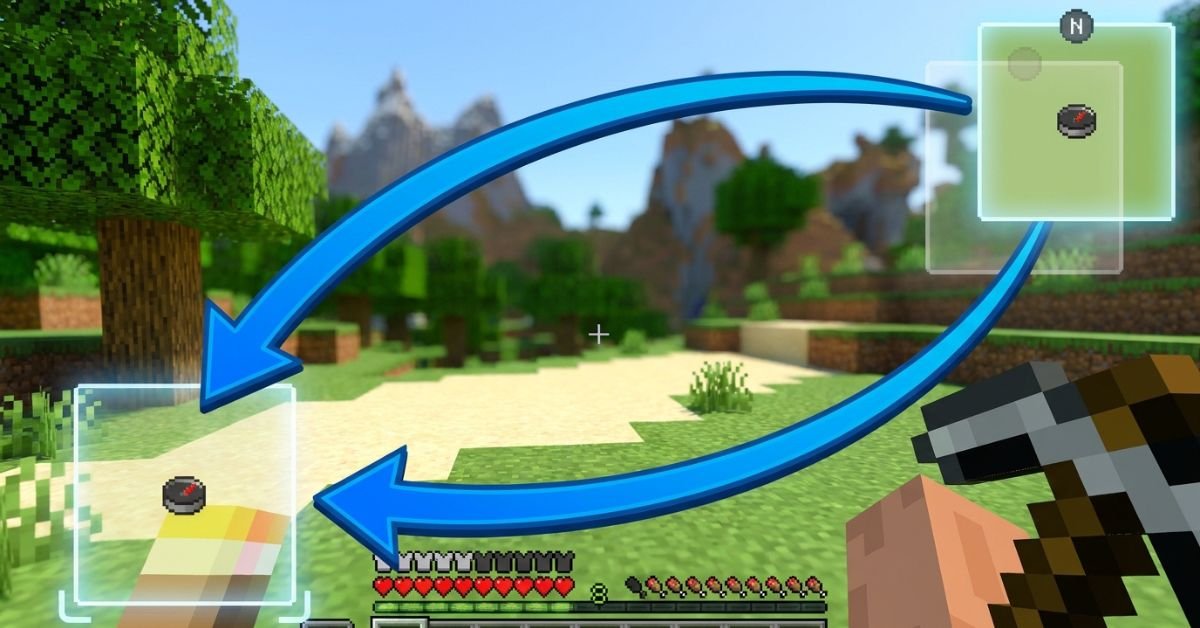
JourneyMap minimap sits stubbornly in the top right, blocking your hotbar or clashing with other HUD mods, and you just want it moved without breaking anything.
JourneyMap remains one of the most popular and powerful minimap mods for Minecraft Java Edition. It gives you a live radar-style minimap, full-screen mapping, waypoints, cave mapping, and deep customization. In 2026, with Minecraft 1.21+ and newer Fabric/Forge versions, the minimap positioning system is more flexible than ever, including true custom dragging.
Understanding JourneyMap’s Minimap System
JourneyMap displays a small, real-time map in one corner of your screen by default (usually top right). It shows terrain, mobs, players, waypoints, and info like coordinates or biome.
The mod supports two independent minimap presets. Each preset can have its own position, style (square/circular), zoom, displayed elements, and opacity. Switch between them instantly with a single keypress.
Key hotkeys you’ll use often:
- J Open full-screen map (and access settings from there)
- Ctrl + J Toggle minimap visibility
- ** (backslash) Switch between minimap presets
- = / – Zoom minimap in/out
- [ Cycle map types (terrain, cave, etc.)
Position options include: Top Right, Bottom Right, Bottom Left, Top Left, Top Center, Center, and Custom.
Step-by-Step: How to Change Minimap Position
Method 1: Quick Preset Changes (Easiest for Most Players)
- Press J to open the full-screen map.
- Click the Settings icon (gear) at the bottom, or press O.
- Navigate to Minimap (or Minimap Preset 1 / Preset 2).
- Find the Position dropdown.
- Choose from Top Right, Bottom Right, Bottom Left, Top Left, Top Center, or Center.
- Close the menu changes apply immediately.
You can configure Preset 1 and Preset 2 differently, then switch live with the ** key. This lets you have one clean minimap for exploration and another packed with info for building or PvP.
Method 2: True Custom Position (Drag Anywhere)
- Open full-screen map with J → Settings.
- Set Position to Custom.
- Return to the game world.
- Hold the configured move key (or use arrow keys) to drag the minimap freely.
- Fine-tune with the Minimap Key Move Pixel Offset setting (default 0.001) for precise pixel-level control.
Custom mode gives you pixel-perfect placement anywhere on screen perfect when other mods clutter the corners.
Method 3: In-Game Adjustments and Hotkeys
Some players prefer direct controls:
- Open settings via full-screen map for full access.
- Adjust related options like opacity, shape, info slots, and what displays (waypoints, players, mobs, light level, etc.).
Pro tip: After moving, test in different situations underground caves, dense forests, or with shaders active because render layers can shift slightly.
Comparison: Position Options in JourneyMap (2026)
| Position Option | Best For | Flexibility | Easy to Switch? | Notes |
|---|---|---|---|---|
| Top Right (Default) | Standard clean HUD | Low | Yes | Classic placement, rarely overlaps hotbar |
| Bottom Right | When top is crowded | Low | Yes | Good with action bars on left |
| Bottom Left | Players who read left-to-right | Low | Yes | Common with inventory-focused mods |
| Top Left | Minimal interference | Low | Yes | Avoid if you have chat or notifications |
| Top Center / Center | Dramatic or centered builds | Medium | Yes | Can feel intrusive during combat |
| Custom | Perfect personal HUD | Highest | Moderate | Drag freely + pixel offset tuning |
Custom wins for most experienced players once you spend five minutes setting it up.
Myth vs Fact
Myth: You can only put the minimap in the four corners. Fact: JourneyMap supports Top Center, Center, and full Custom drag mode for anywhere on screen.
Myth: Changing position requires editing config files manually. Fact: Everything is done in-game through the settings menu or hotkeys no file editing needed in recent versions.
Myth: The minimap resets position every time you restart Minecraft. Fact: Settings save per world/profile as long as you close the game properly.
Myth: Custom position only works with certain Minecraft versions. Fact: As of 2026 versions (1.21+), Custom drag and presets work reliably on Fabric, Forge, and NeoForge.
Real-World Insights From Years of Modded Play
After running JourneyMap in hundreds of modpacks across different Minecraft versions from 1.16 through 1.21+, the biggest mistake I see is players fighting the default top-right position instead of using the two presets properly. One preset for a minimal radar during exploration, another fully loaded for base building or resource hunting switching with feels like night and day.
Another common issue: conflicts with shader packs or other HUD mods (like AppleSkin or inventory tweaks). Setting Position to Custom and nudging it a few pixels usually solves overlap instantly. In 2025–2026 testing, the in-game settings menu has become even more responsive, with changes applying without needing a relog.
FAQs
How do I move the JourneyMap minimap to a different corner?
Press J to open the full map, click Settings (or press O), go to Minimap settings, and change the Position dropdown to Bottom Right, Top Left, or any preset option. Changes apply live.
Can I drag the JourneyMap minimap anywhere on screen?
Yes. Set Position to Custom in the settings menu, then use arrow keys or the move control to drag it freely. Adjust the pixel offset for finer control.
How do I switch between two different minimap presets?
The default key is ** (backslash). Configure Preset 1 and Preset 2 separately with different positions, sizes, or displayed info, then switch on the fly.
Why can’t I move my JourneyMap minimap?
Make sure you’re not in a conflicting mod setup (like certain VR mods). Try setting Position to Custom, or check that the minimap isn’t disabled. Restarting the game or updating JourneyMap often fixes stubborn cases.
Does changing minimap position affect performance?
Position changes are purely visual and have zero impact on FPS. Adjust opacity or disable heavy features (like high-quality cave mapping) if you need performance gains instead.
Is there a way to completely hide or disable the minimap?
Yes use Ctrl + J to toggle it off quickly, or turn off “Show Minimap” in the settings for a permanent change.
Conclusion
Changing the minimap position in JourneyMap comes down to understanding presets, the Position dropdown, and Custom drag mode. The core entities minimap presets, position options (corners + custom), hotkeys like J and , and in-game settings menu give you full control over how the mod fits your playstyle.
-

 ENTERTAINMENT12 months ago
Tesla Trip Planner: Your Ultimate Route and Charging Guide
-

 TECHNOLOGY12 months ago
FaceTime Alternatives: How to Video Chat on Android
-

 BLOG12 months ago
Camel Toe Explained: Fashion Faux Pas or Body Positivity?
-

 BUSNIESS12 months ago
Careers with Impact: Jobs at the Australian Services Union
-

 BLOG11 months ago
Jalalabad India: A Hidden Gem of Punjab’s Heartland
-

 FASHION11 months ago
Wrist Wonders: Handcrafted Bracelet Boutique
-

 ENTERTAINMENT11 months ago
Centennial Park Taylor Swift: Where Lyrics and Nashville Dreams Meet
-

 BUSNIESS11 months ago
Chief Experience Officer: Powerful Driver of Success